0
0
 0
0
Read Time:14 Minute, 36 Second
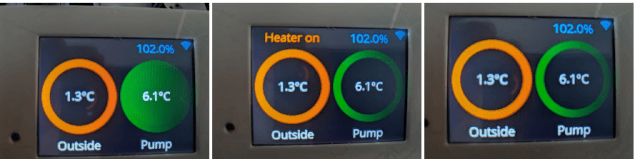
Example ESPHome config for a sample touchscreen display using the CYB ESP32 board (Cheap Yellow Board). https://www.amazon.co.uk/gp/product/B0CWTNLB1B
Case – CYD with a CYB (Cheap Yellow Display with a Cheap Yellow Box) by pedro_p – Thingiverse
The sample here contains testing code so some contents are not really needed and are left in for future investigation.
At the moment the panel has the following functions
- Multiple pages, touching screen when on switches page
- screen turned off if not touched in 2 mins
- Outside and pump temperatures shown in circle coloured by temp range
- pump circle fully filled in when pump is on
- if pump heater is on this is shown in orange text
- water tank level is shown
- wi-fi strength is shown
- page 2 shows a simple graph of the last 1 hr temperatures
Obviously the specific combination of tasks here is only for me but it does give a decent example of how to do this type of thing and take values from home assistant
Update for ESPHOME 2025.06 onwards
#
# Create a folder named fonts in your ESPHome folder, and copy the file fonts/materialdesignicons-webfont.ttf there.
#
substitutions:
device_name: yellowtft4
friendly_name: Yellow TFT 4
# ============================================================
# Standard ESPHome setup
#
# ESPHome naming
esphome:
name: $device_name
friendly_name: $friendly_name
# The ESP32-2432S028R uses a standard ESP32-WROVER, so we use the esp32dev defintion
esp32:
board: esp32dev
framework:
type: arduino
# Enable logging
logger:
# Enable Home Assistant API
api:
encryption:
key: !secret api_key
# Set OTA password
ota:
platform: esphome
password: !secret ota_password
# Setup WiFi credentials
wifi:
ssid: !secret wifi_ssid
password: !secret wifi_password
# Enable fallback hotspot (captive portal) in case wifi connection fails
ap:
ssid: $device_name Fallback Hotspot
password: !secret ap_password
captive_portal:
globals:
- id: wifi_iconstring
type: std::string
restore_value: no
initial_value: '""'
- id: recent_touch
type: bool
restore_value: no
initial_value: "true"
font:
- file: "fonts/materialdesignicons-webfont.ttf"
id: mdi_medium
size: 24
glyphs: [
"", # no-wifi
"", # low-wifi
"", # wifi-1
"", # wifi-2
"", # wifi-3
"", # wifi-4
]
- file: "fonts/OpenSans-Regular.ttf"
id: main_font
size: 24
color:
- id: ha_blue
hex: 51c0f2
- id: ha_red
red: 100%
green: 20%
blue: 25%
white: 0%
- id: ha_orange
hex: EF6C00
- id: ha_green
red: 0%
green: 50%
blue: 0%
white: 0%
light:
- platform: monochromatic
output: backlight_pwm
name: Display Backlight
id: backlight
restore_mode: ALWAYS_ON
- platform: rgb
name: LED
id: led
red: output_red
green: output_green
blue: output_blue
restore_mode: ALWAYS_OFF
binary_sensor:
- platform: touchscreen
name: FullScreenTouch
x_min: 1
x_max: 320
y_min: 1
y_max: 240
spi:
- id: tft
clk_pin: GPIO14
mosi_pin: GPIO13
miso_pin: GPIO12
- id: touch
clk_pin: GPIO25
mosi_pin: GPIO32
miso_pin: GPIO39
output:
- platform: ledc
pin: GPIO21
id: backlight_pwm
inverted: false
- platform: ledc
id: output_red
pin: GPIO4
inverted: true
- platform: ledc
id: output_green
pin: GPIO16
inverted: true
- platform: ledc
id: output_blue
pin: GPIO17
inverted: true
script:
- id: update_ui_values
then:
- lambda: |-
id(my_display).update();
if (isnan(id(wifi_signal_pct).state))
id(wifi_iconstring) = ""; // No-wifi
else if (id(wifi_signal_pct).state < 10)
id(wifi_iconstring) = ""; // low-wifi
else if (id(wifi_signal_pct).state < 30)
id(wifi_iconstring) = ""; // wifi-1
else if (id(wifi_signal_pct).state < 50)
id(wifi_iconstring) = ""; // wifi-2
else if (id(wifi_signal_pct).state < 75)
id(wifi_iconstring) = ""; // wifi-3
else
id(wifi_iconstring) = ""; // wifi-4
interval:
- interval: 5s
then:
- script.execute: update_ui_values
- interval: 10s
then:
- if:
condition:
- lambda: |-
return id(pumpon).state == "on";
then:
- light.turn_on: backlight
else:
- lambda: |-
id(recent_touch) = false;
- interval: 10s
then:
- if:
condition:
- lambda: |-
return id(heater).state == "on";
then:
- light.turn_on: backlight
else:
- lambda: |-
id(recent_touch) = false;
- interval: 120s
then:
- if:
condition:
- lambda: |-
return !id(recent_touch);
then:
- light.turn_off: backlight
else:
- lambda: |-
id(recent_touch) = false;
display:
- platform: ili9xxx
model: ili9341
invert_colors: false
color_palette: 8BIT
spi_id: tft
data_rate: 20MHz # SLOW DOWN from 40MHz
cs_pin: GPIO15
dc_pin: GPIO2
transform:
swap_xy: true
dimensions:
width: 320
height: 240
id: my_display
pages:
- id: page1
lambda: |-
ESP_LOGD("display", "out_temp: %.2f, pump_temp: %.2f, heater state: %s, pumpon state: %s",
id(out_temp).state,
id(pump_temp).state,
id(heater).state.c_str(),
id(pumpon).state.c_str());
it.fill(Color::BLACK);
it.print(296, 0, id(mdi_medium), id(ha_blue), id(wifi_iconstring).c_str());
float out_val = id(out_temp).state;
float pump_val = id(pump_temp).state;
float tankpct = id(tankpercent).state;
Color out_color = ha_green; // green
if (isnan(out_val)) out_color = Color::BLACK;
else if (out_val < 3) out_color = ha_red; // red
else if (out_val < 6) out_color = ha_orange; // orange
Color pump_color = ha_green;
if (isnan(pump_val)) pump_color = Color::BLACK;
else if (pump_val < 3) pump_color = ha_red;
else if (pump_val < 6) pump_color = ha_orange;
Color heater_color = (id(heater).state == "on") ? ha_orange : Color::BLACK;
Color pumpon_color = (id(pumpon).state == "on") ? ha_green : Color::BLACK;
it.filled_circle(80, 120, 75, out_color);
it.filled_circle(240, 120, 75, pump_color);
it.filled_circle(80, 120, 60, Color::BLACK);
it.filled_circle(240, 120, 60, pumpon_color);
it.printf(80, 120, id(main_font), TextAlign::CENTER, "%.1f°C", out_val);
it.printf(240, 120, id(main_font), TextAlign::CENTER, "%.1f°C", pump_val);
it.printf(80, 220, id(main_font), TextAlign::CENTER, "Outside");
it.printf(240, 220, id(main_font), TextAlign::CENTER, "Pump");
it.printf(240, 20, id(main_font), heater_color, TextAlign::CENTER, "Heater on");
it.printf(80, 20, id(main_font), Color::WHITE, TextAlign::CENTER, "%.1f%%", tankpct);
- id: page2
lambda: |-
it.graph(10, 10, id(multi_temperature_graph));
it.printf(10, 140, id(main_font), id(ha_blue), TextAlign::CENTER, "0");
it.printf(240, 221, id(main_font), id(ha_blue), TextAlign::CENTER, "Pump: %.1f°C", id(pump_temp).state);
it.printf(70, 221, id(main_font), id(ha_red), TextAlign::CENTER, "Out: %.1f°C", id(out_temp).state);
- id: page3
lambda: |-
it.graph(10, 10, id(multi_temperature_graph2));
it.printf(10, 140, id(main_font), id(ha_blue), TextAlign::CENTER, "0");
it.printf(240, 221, id(main_font), id(ha_blue), TextAlign::CENTER, "Pump: %.1f°C", id(pump_temp).state);
it.printf(70, 221, id(main_font), id(ha_red), TextAlign::CENTER, "Out: %.1f°C", id(out_temp).state);
touchscreen:
platform: xpt2046
spi_id: touch
cs_pin: GPIO33
interrupt_pin: GPIO36
update_interval: 50ms
threshold: 400
calibration:
x_min: 180
x_max: 3800
y_min: 240
y_max: 3860
transform:
swap_xy: true
on_touch:
then:
- if:
condition:
- light.is_on: backlight
then:
- display.page.show_next: my_display
- script.execute: update_ui_values
else:
- light.turn_on: backlight
- script.execute: update_ui_values
graph:
- id: multi_temperature_graph
duration: 1h
min_value: -10
max_value: 20
y_grid: 5.0
width: 300
height: 200
traces:
- sensor: out_temp
line_type: SOLID
continuous: true
line_thickness: 2
color: ha_red
- sensor: pump_temp
line_type: SOLID
continuous: true
line_thickness: 2
color: ha_blue
- id: multi_temperature_graph2
duration: 12h
min_value: -10
max_value: 20
y_grid: 5.0
width: 300
height: 200
traces:
- sensor: out_temp
line_type: SOLID
continuous: true
line_thickness: 2
color: ha_red
- sensor: pump_temp
line_type: SOLID
continuous: true
line_thickness: 2
color: ha_blue
sensor:
- platform: wifi_signal
name: "WiFi Signal Percent"
filters:
- lambda: return min(max(2 * (x + 100.0), 0.0), 100.0);
unit_of_measurement: "Signal %"
id: wifi_signal_pct
update_interval: 60s
entity_category: "diagnostic"
- platform: homeassistant
id: out_temp
entity_id: sensor.gw2000a_outdoor_temperature
on_value:
then:
- script.execute: update_ui_values
- platform: homeassistant
id: tankpercent
entity_id: sensor.water_tank_percentage
on_value:
then:
- script.execute: update_ui_values
- platform: homeassistant
id: pump_temp
entity_id: sensor.pumphouse_temperature
on_value:
then:
- script.execute: update_ui_values
text_sensor:
- platform: homeassistant
id: heater
entity_id: switch.socket_1_socket
on_value:
then:
- display.page.show: page1
- lambda: 'id(recent_touch) = true;'
- script.execute: update_ui_values
- platform: homeassistant
id: pumpon
entity_id: switch.socket_3_socket
on_value:
then:
- display.page.show: page1
- lambda: 'id(recent_touch) = true;'
- script.execute: update_ui_values
#
# Create a folder named fonts in your ESPHome folder, and copy the file fonts/materialdesignicons-webfont.ttf there.
#
substitutions:
device_name: yellowtft1
friendly_name: Yellow TFT 1
# ============================================================
# Standard ESPHome setup
#
# ESPHome naming
esphome:
name: $device_name
friendly_name: $friendly_name
# The ESP32-2432S028R uses a standard ESP32-WROVER, so we use the esp32dev defintion
esp32:
board: esp32dev
framework:
type: arduino
# Enable logging
logger:
# Enable Home Assistant API
api:
encryption:
key: !secret api_key
# Set OTA password
ota:
platform: esphome
password: !secret ota_password
# Setup WiFi credentials
wifi:
ssid: !secret wifi_ssid
password: !secret wifi_password
# Enable fallback hotspot (captive portal) in case wifi connection fails
ap:
ssid: $device_name Fallback Hotspot
password: !secret ap_password
captive_portal:
# Set up some global variables for some values that we want to persist
globals:
- id: wifi_iconstring
type: std::string
restore_value: no
initial_value: '""'
- id: recent_touch
type: bool
restore_value: no
initial_value: "true"
- id: out_colour
type: esphome::Color
restore_value: yes
initial_value: ha_blue
- id: pump_colour
type: esphome::Color
restore_value: yes
initial_value: ha_blue
- id: heater_colour
type: esphome::Color
restore_value: yes
initial_value: ha_blue
- id: pumpon_colour
type: esphome::Color
restore_value: yes
initial_value: ha_blue
# ============================================================
# ESPHome Display related setup
#
# Create a font to use, add and remove glyphs as needed
# The Material Design Icon font is going to be used to display wifi
# state as well as displaying the lightbulb icons
font:
- file: "fonts/materialdesignicons-webfont.ttf"
id: mdi_medium
size: 24
glyphs: [
"", # no-wifi
"", # low-wifi
"", # wifi-1
"", # wifi-2
"", # wifi-3
"", # wifi-4
]
- file: "fonts/OpenSans-Regular.ttf"
id: main_font
size: 24
# Create a Home Assistant blue color
color:
- id: ha_blue
hex: 51c0f2
- id: ha_red
red: 100%
green: 20%
blue: 25%
white: 0%
- id: ha_orange
hex: EF6C00
- id: ha_green
red: 0%
green: 50%
blue: 0%
white: 0%
# ============================================================
# Home Assistant related setup
#
light:
- platform: monochromatic
output: backlight_pwm
name: Display Backlight
id: backlight
restore_mode: ALWAYS_ON
# Set up the LED on the back and turn it off by default
- platform: rgb
name: LED
id: led
red: output_red
green: output_green
blue: output_blue
restore_mode: ALWAYS_OFF
# Setup two binary sensors for the two areas for touch
binary_sensor:
- platform: touchscreen
name: FullScreenTouch
x_min: 1
x_max: 320
y_min: 1
y_max: 240
# ============================================================
# Hardware related setup
#
# Setup SPI for the display. The ESP32-2432S028R uses separate SPI buses for display and touch
spi:
- id: tft
clk_pin: GPIO14
mosi_pin: GPIO13
miso_pin: GPIO12
- id: touch
clk_pin: GPIO25
mosi_pin: GPIO32
miso_pin: GPIO39
# Setup a pin to control the backlight and channels for the red/green/blue of the LED on the back
output:
- platform: ledc
pin: GPIO21
id: backlight_pwm
- platform: ledc
id: output_red
pin: GPIO4
inverted: true
- platform: ledc
id: output_green
pin: GPIO16
inverted: true
- platform: ledc
id: output_blue
pin: GPIO17
inverted: true
# Setup a script that can update the UI values independent of the display lambda
# so that we're not trying to pull the WiFi signal strength every single frame
script:
- id: update_ui_values
then:
- lambda: |-
if (isnan(id(wifi_signal_pct).state))
id(wifi_iconstring) = ""; // No-wifi
else if (id(wifi_signal_pct).state < 10)
id(wifi_iconstring) = ""; // low-wifi
else if (id(wifi_signal_pct).state < 30)
id(wifi_iconstring) = ""; // wifi-1
else if (id(wifi_signal_pct).state < 50)
id(wifi_iconstring) = ""; // wifi-2
else if (id(wifi_signal_pct).state < 75)
id(wifi_iconstring) = ""; // wifi-3
else
id(wifi_iconstring) = ""; // wifi-4
id(out_colour) = id(ha_green);
if (isnan(id(out_temp).state))
{
id(out_colour) = id(Color::BLACK);
}
if (id(out_temp).state < 3)
{
id(out_colour) = id(ha_red);
}
if (id(out_temp).state < 6)
{
id(out_colour) = id(ha_orange);
}
id(pump_colour) = id(ha_green);
if (isnan(id(pump_temp).state))
{
id(pump_colour) = id(Color::BLACK);
}
if (id(pump_temp).state < 3)
{
id(pump_colour) = id(ha_red);
}
if (id(pump_temp).state < 6)
{
id(pump_colour) = id(ha_orange);
}
if (id(heater).state == "on" )
{
id(heater_colour) = id(ha_orange);
}
else
{
id(heater_colour) = id(Color::BLACK);
}
if(id(pumpon).state == "on" and id(pumpon_colour) != id(ha_green))
{
auto call = id(backlight).turn_on();
call.set_transition_length(1000); // in ms
call.set_brightness(1.0); // 1.0 is full brightness
call.perform();
}
if (id(pumpon).state == "on" )
{
id(pumpon_colour) = id(ha_green);
}
else
{
id(pumpon_colour) = id(Color::BLACK);
}
# Update the UI state every 10 seconds
interval:
- interval: 10s
then:
- script.execute: update_ui_values
# Every 120 seconds check to see if we had a recent touch and
# turn off the backlight if we haven't. This does mean that it
# can be up to 240 seconds until the backlight turns off
- interval: 120s
then:
- if:
condition:
- lambda: |-
return !id(recent_touch);
then:
light.turn_off:
id: backlight
else:
- lambda: |-
id(recent_touch) = false;
# Setup the ili9xxx platform
#
# Display is used as 240x320 by default so we rotate it to 90°
display:
- platform: ili9xxx
model: ili9341
invert_colors: false
spi_id: tft
cs_pin: GPIO15
dc_pin: GPIO2
transform:
swap_xy: true
dimensions:
width: 320
height: 240
id: my_display
pages:
- id: page1
lambda: |-
it.fill(id(Color::BLACK));
it.print(296, 0, id(mdi_medium), id(ha_blue), id(wifi_iconstring).c_str());
it.filled_circle(80, 120, 75, id(out_colour));
it.filled_circle(240, 120, 75, id(pump_colour));
it.filled_circle(80, 120, 60, id(Color::BLACK));
it.filled_circle(240, 120, 60, id(pumpon_colour));
it.printf(80, 120, id(main_font),TextAlign::CENTER, "%.1f°C", id(out_temp).state);
it.printf(240, 120, id(main_font),TextAlign::CENTER, "%.1f°C", id(pump_temp).state);
it.printf(80, 220, id(main_font),TextAlign::CENTER, "Outside");
it.printf(240, 220, id(main_font),TextAlign::CENTER, "Pump");
it.printf(240, 20, id(main_font),id(ha_blue),TextAlign::CENTER, "%.1f%%", id(tankpercent).state);
it.printf(80, 20, id(main_font),id(heater_colour),TextAlign::CENTER, "Heater on");
- id: page2
lambda: |-
it.graph(10, 10, id(multi_temperature_graph));
it.printf(10, 140, id(main_font),id(ha_blue),TextAlign::CENTER, "0");
it.printf(240, 221, id(main_font),id(ha_blue),TextAlign::CENTER, "Pump:%.1f°C", id(pump_temp).state);
it.printf(70, 221, id(main_font),id(ha_red),TextAlign::CENTER, "Out:%.1f°C", id(out_temp).state);
# Set up the xpt2046 touch platform
touchscreen:
platform: xpt2046
spi_id: touch
cs_pin: GPIO33
interrupt_pin: GPIO36
update_interval: 50ms
threshold: 400
calibration:
x_min: 180
x_max: 3800
y_min: 240
y_max: 3860
transform:
swap_xy: true
# When the display is touched, turn on the backlight,
# store that we had a recent touch, and update the UI
# if the backlight is on then we want the next page instead
on_touch:
then:
if:
condition:
- light.is_on: backlight
then:
- display.page.show_next: my_display
- lambda: 'id(recent_touch) = true;'
- script.execute: update_ui_values
else:
- light.turn_on: backlight
- lambda: 'id(recent_touch) = true;'
- script.execute: update_ui_values
graph:
# Show multi-trace graph
- id: multi_temperature_graph
duration: 1h
min_value: -10
max_value: 20
y_grid: 5.0 # degC/div
width: 300
height: 200
traces:
- sensor: out_temp
line_type: DASHED
continuous: true
line_thickness: 2
color: ha_red
- sensor: pump_temp
line_type: SOLID
continuous: true
line_thickness: 2
color: ha_blue
# Wifi sensor that drives the UI signal strength icon
sensor:
- platform: wifi_signal # Reports the WiFi signal strength in %
name: "WiFi Signal Percent"
filters:
- lambda: return min(max(2 * (x + 100.0), 0.0), 100.0);
unit_of_measurement: "Signal %"
id: wifi_signal_pct
update_interval: 60s
entity_category: "diagnostic"
- platform: homeassistant
id: out_temp
entity_id: sensor.gw2000a_outdoor_temperature
on_value:
then:
if:
condition:
lambda: 'return id(out_temp);'
then:
- logger.log:
level: DEBUG
format: 'Light ON time changed from %d to %d seconds'
args: ['id(out_temp)', 'int(x)']
# - globals.set:
# id: out_temp2
# value: !lambda 'return int(x);'
#water_tank_percentage
- platform: homeassistant
id: tankpercent
entity_id: sensor.water_tank_percentage
on_value:
then:
if:
condition:
lambda: 'return id(tankpercent);'
then:
- logger.log:
level: DEBUG
format: 'tankpercent %d'
args: ['id(tankpercent)']
- platform: homeassistant
id: pump_temp
entity_id: sensor.pumphouse_temperature
on_value:
then:
if:
condition:
lambda: 'return id(pump_temp);'
then:
- logger.log:
level: DEBUG
format: 'Light ON time changed from %d to %d seconds'
args: ['id(pump_temp)', 'int(x)']
text_sensor:
- platform: homeassistant
id: heater
entity_id: switch.socket_1_socket
on_value:
then:
if:
condition:
lambda: 'return id(heater);'
then:
- logger.log:
level: DEBUG
format: 'Heater %d'
args: ['id(heater)']
- platform: homeassistant
id: pumpon
entity_id: switch.socket_3_socket
on_value:
then:
if:
condition:
lambda: 'return id(pumpon);'
then:
- logger.log:
level: DEBUG
format: 'Pump %d'
args: ['id(pumpon)']


Happy
0 %

Sad
100 %

Excited
0 %

Sleepy
0 %

Angry
0 %

Surprise
0 %